

If you've spent any time wiring up an AI agent to actually do something on the web - book a meeting in your calendar, pull a report from a SaaS dashboard, post a draft to your CMS - you've hit the same wall everyone hits. The demos look magical. The reality looks like a headless Chromium instance staring at a login screen, with your agent helpfully offering to "create an account" on the service you've been paying for since 2021.
This is the gap between AI agent marketing and AI agent reality, and it's the gap Relay for AI Agents is built to close.
Relay is a free, open-source MCP (Model Context Protocol) server that connects Claude, Cursor, Cline, Codex CLI, or any MCP-compatible agent to your real, logged-in Chromium browser - not a sterile headless one. Your agent works inside the browser you already use, with your sessions intact, your cookies intact, and your two-factor auth already through.
This post explains why that matters, what Relay actually does, and how to get it running in under two minutes.
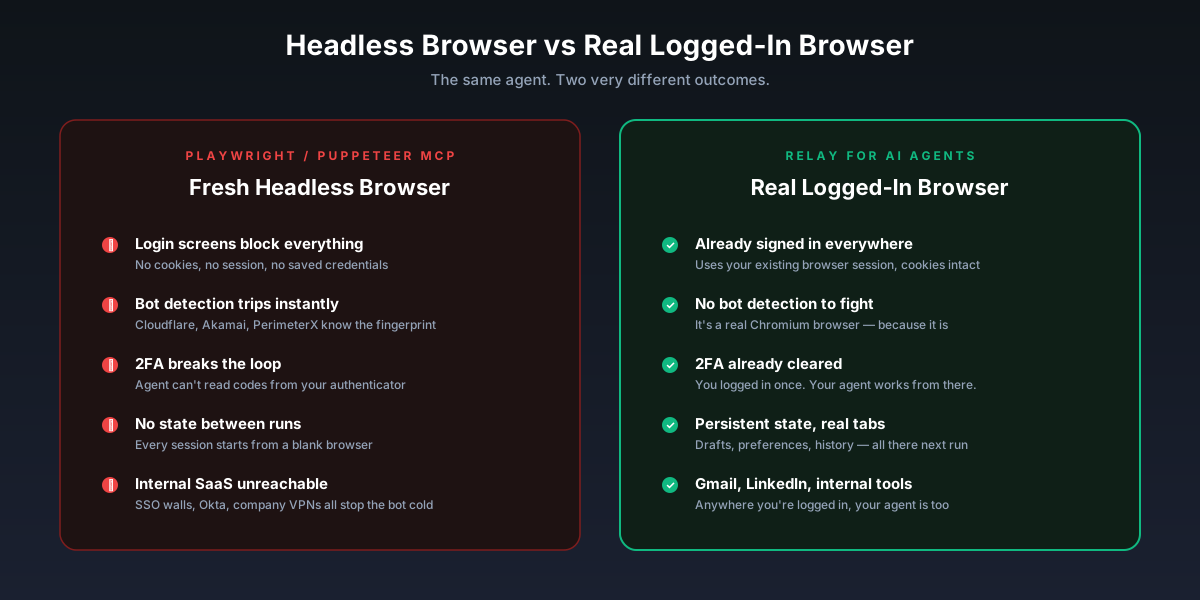
The Headless Browser Problem
The current default for "give an AI agent a browser" is something like Playwright MCP or Puppeteer MCP. They work like this: the agent asks for a page, the server spins up a fresh Chromium process, navigates to the URL, and returns the result.
For static content scraping or filling out a public form, fine. For anything else, the wheels come off immediately:
- Logins fail. The fresh browser has no cookies, no session, no saved credentials. Gmail asks for your password. LinkedIn shows a captcha. Your company's internal Notion redirects to SSO.
- Bot detection kicks in. Cloudflare, PerimeterX, Akamai - they're tuned to spot exactly the fingerprint that headless Chromium presents. Your agent gets a 403 or an infinite captcha loop.
- Two-factor breaks the loop. Even if your agent could type a password, it can't read the code from your authenticator app.
- State doesn't persist. Every run starts from a blank browser. Anything the agent learned last time - a preference, a draft, a workflow checkpoint - is gone.
The workarounds are all bad. You can give the agent a stored cookie jar, which works until it expires and which you really shouldn't be doing with production credentials. You can run a persistent headful browser in a VNC session and hope nothing logs you out. You can rebuild every authenticated workflow as an API integration - assuming the API exists, which for most internal tools it doesn't.
Or you can just let the agent use the browser you're already logged into.
What Relay Does
Relay takes a different approach. Instead of launching its own browser, it attaches to one that's already running and already authenticated - yours.
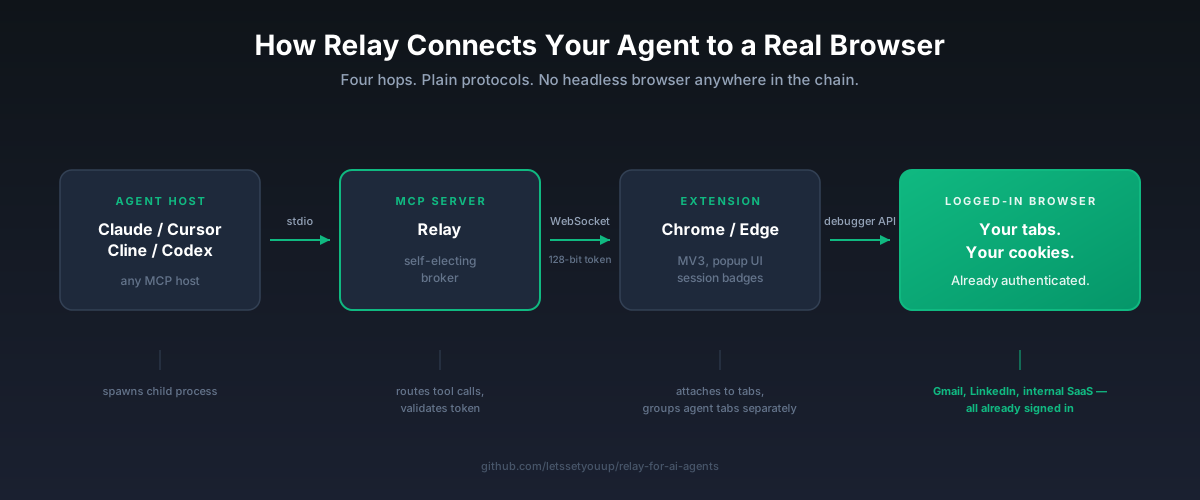
The architecture is three pieces:
- An MCP server that speaks standard stdio MCP, so any MCP-compatible host can talk to it.
- A Chromium browser extension (Chrome and Edge) that runs inside your browser and exposes its tabs to the server.
- A WebSocket bridge between the two, secured with 128-bit bearer tokens generated via
crypto.randomBytes.
Your agent calls a tool - navigate, read_page, click, form_input, whatever - and the call routes through the MCP server, over WebSocket, into the extension, and into a real Chromium tab. The agent sees real, logged-in content. Sites see a real browser doing real browser things, because that's exactly what's happening.
Critically, the extension separates agent-controlled tabs from your own browsing into a distinct tab group, so you don't get blindsided by your agent navigating away from your half-written email.
The 17 Tools
Relay ships 17 browser tools out of the box, organized into six categories. They map cleanly onto everything a person actually does in a browser, which is the point - you want your agent's vocabulary to match the real interaction surface.
Tab management (tabs_context_mcp, tabs_create_mcp, tabs_close_mcp) — open, close, switch, and inspect tabs. Agent tabs stay grouped separately from yours.
Input and interaction (computer, click-by-ref, hover) — the full set: screenshot, click, hover, type, key press, scroll, wait. Anything a human does with a mouse and keyboard, your agent does too.
Page reading (read_page, get_page_text, find) — full accessibility tree, plain text extraction, CSS and text search. The agent knows exactly what's on the screen, not just what's in the rendered pixels.
Form handling (form_input, select_option, file_upload) — fill inputs, select dropdowns, upload files. Real form interaction at scale.
Window control (resize_window, navigate) — resize the viewport for responsive testing, breakpoint-specific scraping, or precise screenshots.
DevTools access (read_console_messages, read_network_requests, javascript_tool) - read console logs, intercept network requests, execute JavaScript directly in the page context. This last category is what separates Relay from "browser as a click-machine" tools. Your agent can debug and inspect at the level a developer would.
The Architecture Pieces That Matter
A few design decisions are worth calling out because they affect how the tool behaves under real-world load.
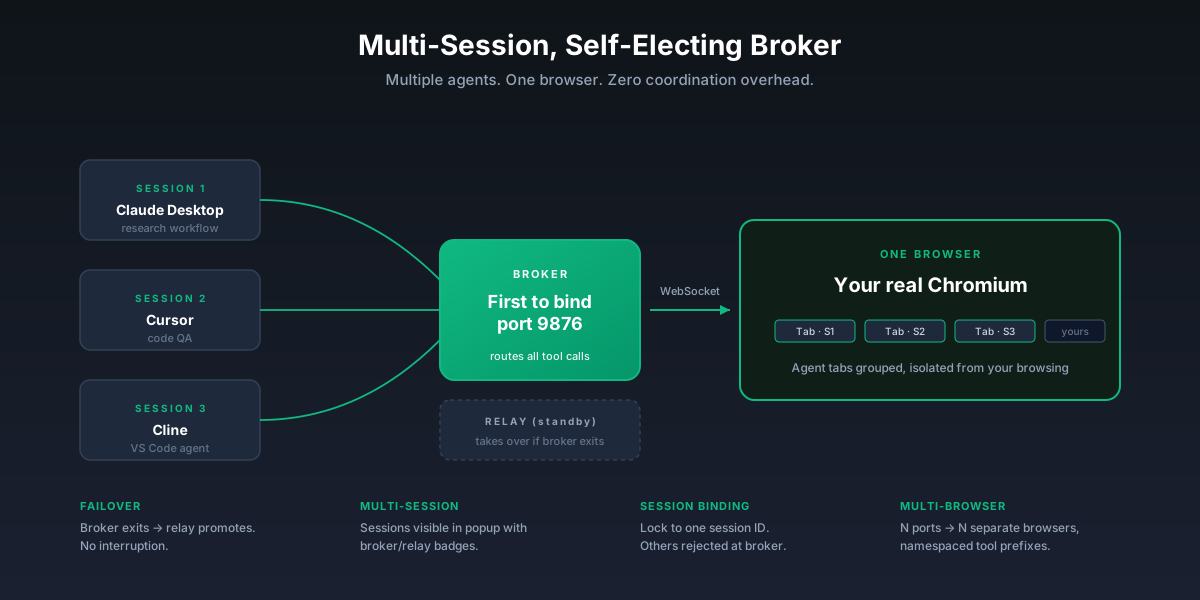
Self-electing broker. The first MCP server to bind the port becomes the broker. Other instances connect as relays. If the broker exits, another takes over - no interruption to your session. This is what lets you run multiple agents against the same browser without coordinating them manually.
Multi-session. Several agent sessions can drive the same browser at once. The extension popup shows every active session with broker and relay badges so you can see exactly what's connected.
Multi-browser. Need separate browsers for separate workflows? Register multiple MCP entries on different ports. Each appears to the agent as a distinct, namespaced tool prefix - one for your work browser, one for personal, one for the Linux VM you use for testing.
Session binding. Lock the extension to a specific session ID. Any tool call from any other session gets rejected at the broker level. This is the safety net for shared-machine and team scenarios.
Token auth. 128-bit hex tokens. Required for any non-loopback host. Pair with Tailscale or another encrypted overlay network for remote setups, and you've got a setup that's actually safe to run across machines.
What You Can Actually Do With This
A few concrete workflows that headless browsers can't touch but Relay handles on day one:
- Inbox triage in Gmail. Your agent reads your unread messages, drafts responses in your voice, files things into the right labels — all inside the Gmail tab you're already signed into.
- LinkedIn outreach and research. Pull profiles, draft personalized messages, queue them for review. No login fight, no captcha loop.
- Internal SaaS dashboards. Your company's BI tool, support console, admin panel - anything behind SSO. Your agent works there because you're logged in there.
- Multi-step web workflows. Apply to jobs, fill out vendor onboarding forms, reconcile data between two web apps. The agent can carry context across tabs the way a person does.
- Front-end debugging and QA. Resize the viewport, run JavaScript in the console, intercept network requests, screenshot at specific breakpoints. Your agent becomes a junior QA engineer with full DevTools access.
The pattern: anywhere a human currently logs in and clicks around, your agent can now do the same thing.
Setup: Under Two Minutes
The install script handles Claude Desktop, Cursor, and the rest:
# Local setup — browser on the same machine
node install.mjs

# Remote setup — generates a token, prints next steps
node install.mjs --remote
Then load the extension:
chrome://extensions → Developer mode → Load unpacked → extension/Restart your MCP host. The extension popup turns green within a few seconds. Your agent now has a real browser.
Prerequisites are minimal: Node.js 18+, Chrome or Edge, any MCP-compatible host. The full guide in docs/install-and-usage.pdf covers the Microsoft Store Claude Desktop quirk, Tailscale setup for remote browsers, multi-browser configuration, and troubleshooting.
Security: Read This Part
Because Relay attaches to your real browser, the security model deserves a paragraph instead of a marketing line.
The wire protocol is plain WebSocket. Never expose port 9876 to the open internet. For remote setups, always pair with Tailscale or another encrypted overlay network. The installer refuses to set up a non-loopback host without a token, but transport encryption is on you.
Tokens are 128-bit hex, generated via crypto.randomBytes. Treat them like passwords. Rotate them when team access changes.
The extension uses Chrome's chrome.debugger API, so Chromium shows a yellow "started debugging" banner on every tab the agent touches. That's not Relay being noisy — that's Chrome warning you that something is attached to the debugger. It's unavoidable and it's also exactly the warning you'd want.
Strong recommendation: use a dedicated browser profile for agent control. Sign in to the work apps your agent needs. Don't sign in to your bank, your personal email, or anything else you wouldn't want an automated process to touch.
Compatibility
Because Relay speaks stdio MCP, the host list is open-ended. Confirmed working:
- Claude Desktop
- Cursor
- Cline (VS Code extension)
- Continue.dev
- opencode
- OpenAI Codex CLI
- LangChain, LlamaIndex, CrewAI, raw
@modelcontextprotocol/sdk
Anything that can spawn a child process and speak MCP can drive Relay.
Who This Is For
Relay is most useful if you're one of these people:
- A developer building agentic workflows and hitting auth walls every time you leave the demo path.
- A solo founder or operator who wants an AI to handle the actual web work, not just summarize it.
- A team running internal automations that need to live behind your SSO.
- Anyone who's tired of Playwright MCP launching a fresh browser and forgetting it ever met you.
If your use case is pure public-web scraping with no auth, headless tools are fine and probably easier. If your use case involves anything logged in, Relay is the path that actually works.
Get It
Relay is MIT-licensed, free, and open source. v1.0.0 is the production release.
- GitHub: github.com/letssetyouup/relay-for-ai-agents
- Microsoft Edge Add-ons: available now
- Chrome Web Store: submission in progress
Star the repo if it's useful. File issues if it breaks. Pull requests welcome.
Your AI agent doesn't need another headless browser. It needs the one you're already using.


